Is an Alternate Page With Proper Canonical Tag Harmful for SEO?
While using Google Search Console, you may see a strange phrase under the Indexing → Pages tab — “alternate page with proper canonical tag”. For those of you who are not deep into SEO, this phrase might raise questions and even indicate a potential problem. But is it really so? What does it mean, and can it harm your SEO?
It’s time to take a quick journey into canonical tags and how Google processes duplicate or similar URLs across your website and decides which one deserves to be indexed.
Contents
- Understanding the Meaning of an Alternate Page With a Proper Canonical Tag
- When a Duplicate Page With a Proper Canonical Tag Is Not Harmful
- When This Status Might Indicate a Potential SEO Issue
- How to Diagnose and Resolve Canonicalization Errors
Understanding the Meaning of an Alternate Page With a Proper Canonical Tag
First things first, let’s clarify what this phrase really means, and what some of the most common situations are when it appears. This should help us understand how alternate and canonical pages influence Google’s indexing.
Definition of the Status in Google Search Console
The first time you see what is alternate page with a proper canonical tag inside Google Search Console is, you might do the same thing many site owners do — assume it’s something bad.
The meaning, though, is a lot more boring than the wording makes it sound. Google is essentially saying, “Yeah, I saw this page, but I’m going with a different version because that one looks like the main one.”
Picture this: you publish a blog post, but your CMS automatically generates a print version (why those still exist, nobody knows). To you, it’s the same piece of content. To Google, that’s two URLs. Most sites have dozens of these duplicates without even realizing it: filter pages, tag archives, small tweaks created by plugins… it adds up.
When Google crawls all of this, it does a bit of sorting. Typically, it checks:
- Which page you marked as canonical.
- Whether the duplicates really look like duplicates.
- Whether other signals point to one “winner”.
If everything checks out, Google sets the extra pages aside and moves forward. No red flag. No damage to your rankings. Honestly, if anything, this status is a sign you configured your canonical tag correctly, which already puts you ahead of many site owners.

Source: SEMrush
Common Situations That Trigger This Status
Many of the URLs that lead to this status aren’t intentional. A store with size and color filters creates multiple URL variants instantly, even though all of them show the same product grid. That’s quite normal for the ecommerce sector.
However, most business owners would want Google to only index and rank the central page with the main product. Otherwise, there will be a whole mess with indexed pages, and the store’s ranking will be diluted.
Another example is a blog that uses print templates to create copies of articles without meaning to. In this situation, even an older format hanging around after a redirect can create a temporary twin of a newer page.
These moments are enough for Google to flag the alternatives.
Tellingly, a lot of these variations fall into repeating categories:
- View modes that don’t really change the substance.
- Product filtering options that repeat similar results.
- Tracking strings inserted by marketing automation.
Even small blogs accumulate dozens of these without noticing. And as we have learned, E-commerce sites may generate hundreds through color, size, or availability filters.
More potential triggers may include:
- Feed URLs that act as clones of blog content.
- Search results pages that mimic category listings.
- AMP versions that shadow desktop templates.
Google compares these variations and tries to decide which one matters most. Canonical tags help settle that decision. The alternates simply fall into this status because they duplicate the main page, not because anything is broken.
⚠️ Important note: A canonical tag is not a hard rule for Google to index a certain (canonical page) instead of a duplicate one. Such tags are simply hints for Google, aka recommendations to rank only certain pages. It means that Google will always decide on its own how to index a set of duplicate pages, but usually, canonical tags are enough, i.e., they work as intended.
How Canonical Tags Influence Google’s Indexing Decisions
Canonical tags influence indexing by giving Google direction when similar URLs appear in a crawl. As emphasized above, the keyword is “direction”.
Many sites generate duplicates unintentionally — filters, tracking parameters, minor display adjustments — all of them creating URLs that seem unique on the surface while carrying the same information underneath. These clusters of near-identical pages can confuse crawling unless the canonical tag steps in to clarify the preferred version.
This becomes especially clear in situations such as:
- Grids that repeat the same products with different sorting.
- Alternate viewing modes that barely adjust the presentation.
- Simplified versions that still hold the same text and images.
Once these duplicates surface, Google needs to work out which one belongs in the index. When the content match is extremely close, the canonical tag helps break the tie. It tells the crawler which page should act as the canonical representation of the information. Once again, it’s not a hard rule, but a recommendation.
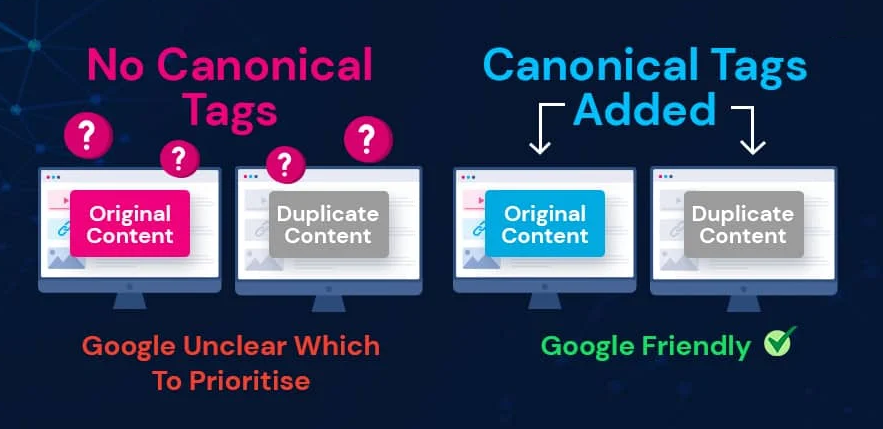
Source: Searchlogistics
Google will make its own decision based on other signals, such as:
- Prominent internal links pointing toward one URL.
- Link equity from external sources flows more intensely into a particular page version.
- Consistent sitemap declarations for preferred pages.
All of these elements combine when Google’s crawlers estimate the budget and decide which page to rank, but the canonical tag often provides the final nudge.
📌 The bottom line: Alternative pages with canonical tags help prevent fragmenting ranking value across several nearly identical URLs and ensure Google understands which page stands as the primary source.
When a Duplicate Page With a Proper Canonical Tag Is Not Harmful
When you see a phrase “alternate page with proper canonical tag,” you should know that in most cases, this is not a mistake; it’s normal. Alternate pages help website owners maintain a clean URL architecture, and Google actually recognizes canonical tags as a positive sign. Let’s review each instance separately.
How Canonical Tags Influence Google’s Indexing Decisions
There are many times when duplicate URLs show up simply because the website is doing what it always does. Filtering, sorting, and tiny layout switches — all of these create new URLs without changing the information.
When that happens, the proper canonical tag becomes the stabilizing point that tells Google which version matters. The alternates exist, but they don’t need attention beyond classification.
Here are a few exemplary situations that explain how alternate pages come into being:
- a product list that changes order but not items;
- simplified page modes that remove sidebars only;
- tracking-heavy URLs that add nothing new to the content.
These alternate URLs don’t need to be indexed because they don’t provide anything unique. A proper canonical tag pointing search engine crawlers to index the “right” (canonical) page brings order to this mess.
Other cases may include:
- tag-based routes echoing category lists;
- lightweight “reader modes” showing the same text;
- mobile templates duplicating desktop content.
Here, the canonical guides Google toward the correct main page. The duplicates fall into place as alternates. Nothing breaks, and nothing is penalized — it’s simply the indexing system functioning smoothly.
Why Google Recognizing the Canonical Is a Positive Sign
When several pages resemble one another so closely that the distinction is barely visible, Google honoring the canonical becomes a sign that the structure of the site communicates clearly.
A change in sorting order, a template that trims the layout, a tiny modification from a plug-in — these can all create an alternative URL that accidentally mirrors the original. But when you insert a canonical tag into each one of those versions, Google is able to “understand” which is the “boss” among your pages and rank only the canonical one.
Some moments where canonical recognition becomes important include:
- AMP templates that shadow the main article almost exactly.
- Tag views that repeat a category’s entire list.
- Mobile versions that match the desktop content point for point.
Although thanks to the mobile-first principle, mobile versions always tend to rank higher than their desktop counterparts, even though the former might be more complete and have more internal links (a clear sign to Google of the authority).

Source: Moz
When Google selects the canonical page, the ranking value stays focused instead of splintering into several versions. The duplicates simply slide into the background category, and the preferred page becomes the stable, indexed one.
When Alternate Pages Help Maintain Clean URL Architecture
Alternate pages often function like the tape behind a poster — invisible, unglamorous, but absolutely keeping things from sliding off the wall. Whenever themes or CMS features try to maintain structure, they generate side-URLs that don’t say anything new but help hold everything in place.
You’ll see this in things like:
- navigation-support URLs created purely to keep menu depth intact;
- secondary versions generated to stabilize long scrolling sections;
- utility pages used by the CMS to prevent layout collapse.
These aren’t meant for users, and barely anyone visits them on purpose. At the same time, other alternates help sketch out the architecture:
- pages that mark transitions between major content groups;
- URLs that reinforce which topics are part of the same cluster;
- boundary pages that stop large categories from blending together.
Once Google labels these as alternates, everything stays clear: the official page leads, and the rest keep the structure upright without cluttering search results.
When a Duplicate Page With a Proper Canonical Tag Is Not Harmful
However, not all alternate pages with proper canonical tags are the same. Some indicate potential problems with your website’s SEO. The situations involve improper use of canonical tags, potential conflicts with internal links that lead to traffic loss, and Google’s fussy behavior, namely, when it refuses to rank the “true” canonical that you intended. Let’s break everything down.
Improper Use of Canonical Tags on Important Pages
Canonical tags are great until they’re placed where they absolutely shouldn’t be. When an important page tells Google, “actually, this other page is the real hero,” Google tends to believe it.
That’s the moment rankings start behaving like they’re on vacation. And all of it begins because someone in your SEO team misunderstood what is considered a valid canonical target.
This sort of issue usually shows up in situations like:
- The main product page accidentally points to an outdated version of itself.
- A high-traffic blog post canonizing a thin tag archive.
- A service page telling Google that a random variation is the “real” canonical one.
These mistakes don’t break the site, but they can absolutely break rankings. And what’s more important, they can and should be avoided at all costs. However, as soon as you recognize and acknowledge them, they usually stop being a problem.
Take a look at these other cases, which are less obvious but just as harmful:
- Wrong canonicals set by plugins with “auto mode” enabled.
- Important URLs accidentally marked by human specialists with cross-domain canonicals.
- Random pages that canonize themselves incorrectly because of template inheritance.
📌 The bottom line: In all these scenarios, the page that should be ranking ends up pushed aside. The problem is simple — Google doesn’t see intent — only signals. And a wrong canonical signal is occasionally enough to convince it to ignore the page you actually care about.
Improper Use of Canonical Tags on Important Pages
A canonical tag on its own is not a magic override. When internal links and sitemaps point in a different direction, Google sees a split vote. That’s one of the classic reasons why a perfectly good page suddenly shows up under “page is not indexed” in Google Search Console.
The core issue is simple: structure and canonicals are telling different stories. Google then has to decide which story to believe.
Typical red flags include:
- A sitemap that proudly lists a URL that almost no internal links ever touch.
- Internal links favor a non-canonical version, while the canonical points somewhere else.
- Canonicals referencing URLs that are missing from the sitemap entirely.
- Pagination or faceted navigation are heavily linked, but canonicalized to a single page without context.
When either of these (or all at once) scenarios happens, Google often concludes that your canonical setup is unreliable. It behaves as a naughty colleague and may ignore the tag, choose its own canonical, or decide none of the candidates are worth indexing.
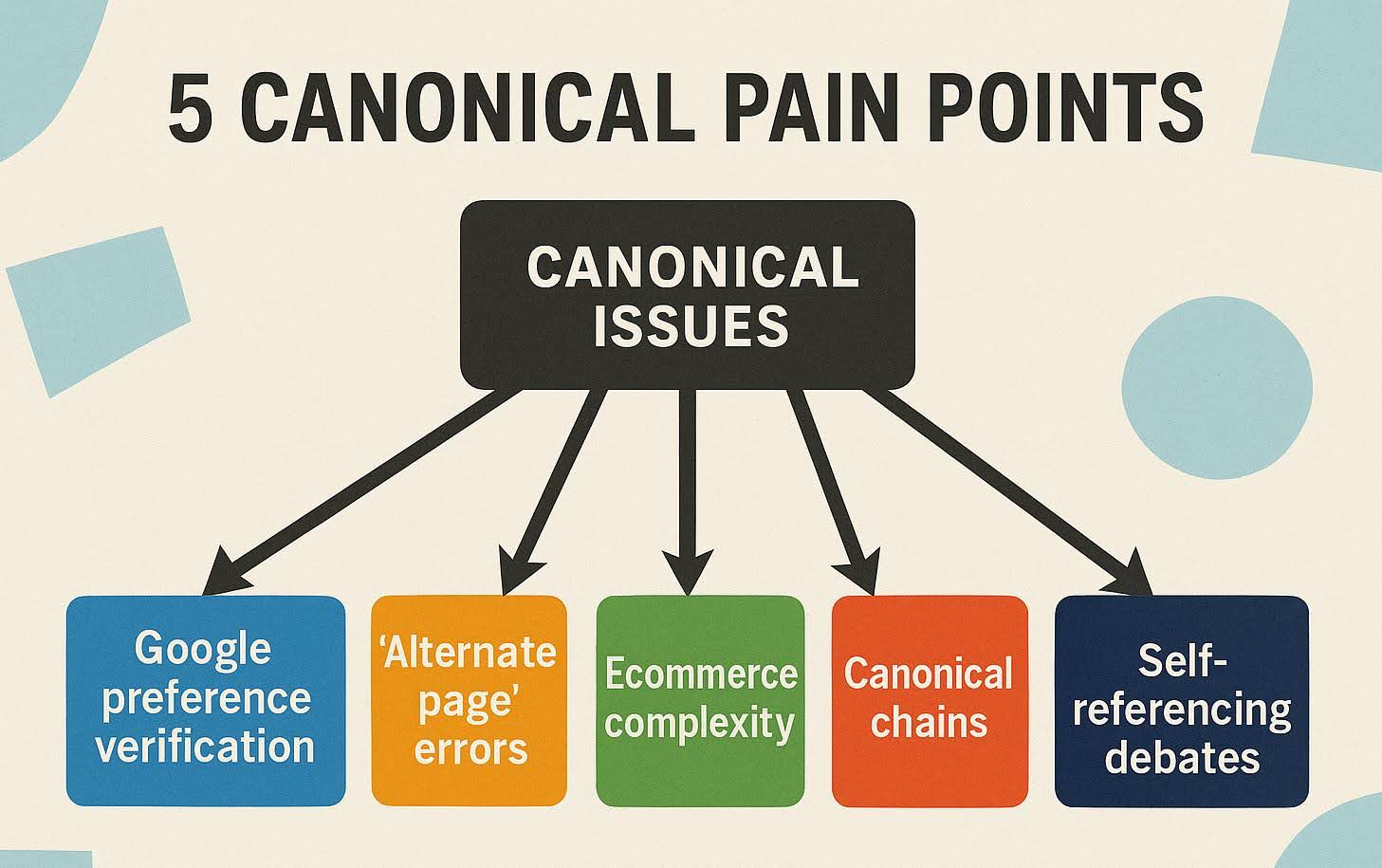
Source: Searchengineland
📌 The bottom line: When canonicalization conflicts with sitemaps or internal linking, the only real fix is to align all three entries. Yes, it takes time, but the ranking benefits are always worth the effort.
Google Choosing a Different Canonical Than You Intended
Google sometimes just goes its own way with canonicals and ranking. You set the tag. Everything looks correct. But then Google looks at the other signals — the linking patterns, the older URLs floating around, the sitemaps — and decides the main page “must” be something else.
It’s trying to resolve the meaning in the context of everything it sees, not only the tag you gave it. And sometimes, the other signals simply shout louder.
Take one case: the “wrong” version of a page keeps appearing in sidebar links because the template wasn’t updated. Google basically counts that as endorsement, and picks that version instead of the one you marked canonical.
Another case: maybe a shorter alternate version of a long page gets shared on social platforms since it loads faster. A few backlinks appear, minor but real. Google interprets this as a user preference and elevates it.
When that happens, it’s not a bug — it’s a sign that something else in the ecosystem needs cleanup. We’ll focus on the concrete diagnosis and resolution methods in the next chapter.
How to Diagnose and Resolve Canonicalization Errors
In 99% of the instances when Google goes off track and decides on a canonical by itself, the problem can be prevented. You only need to be aware of and read the internal signals correctly to ensure the correct canonicals are visible to Google.
Auditing Internal Signals to Ensure the Correct Canonical
The thing with canonicals is that you can set a proper canonical tag, but the rest of the site might be quietly saying something completely different without anyone noticing. And Google listens to the whole… orchestra, not just the one instrument you think is playing the melody. So half the time, the tag itself is fine — it’s the “accidental signals” that pull Google off course.
Sometimes you discover things you didn’t even expect to exist anymore. Old links inside a sidebar template. A sitemap that still thinks it’s 2022. Or some leftover redirect chain that feels like a hallway with too many doors.
You usually find the clues when you look at:
- Weird internal links that still lead to an older copy you forgot was even online.
- Sitemaps listing versions that shouldn’t be there anymore (but are).
- Breadcrumbs that point sideways instead of up.
- Redirects that go from A to B to… something you never intended.
And once those pieces stop contradicting each other, Google stops improvising. The site finally “sounds” like it wants the same page to be canonical, and Google follows that without much resistance. Most fixes aren’t even technical — they’re cleaning up the ghosts.
Fixing Incorrect Canonicals on Template-Generated Pages
Template-generated pages are prone to unintentional mistakes. Not the ones that humans do, but the ones that machines and algorithms do routinely, as part of something else. One little tweak in a theme, or a plugin update that nobody paid attention to, and suddenly half the site is quietly shipping the wrong canonical.
Most canonicalization errors come from these templates doing their own thing behind the scenes, and the worst part is you barely notice until Google points it out with that friendly-but-annoying “alternate page” message.
The solution: Randomly check a few pages across the same template, because they tend to behave like a flock. If one is wrong, the rest usually follow. Yes, it’s a pure human work, all machines and AI assistants aside, but this is what really works and fixes those unintentional algorithmic canonicalization errors.
Once you understand the pattern, how to fix it becomes less mysterious. You go into the template, track down the bit that prints canonicals, and stop it from using a “one-size-fits-all” tag. Some themes reuse the same canonical for everything. Others build it dynamically but pull the wrong URL variable. Sometimes it’s a caching layer that keeps inserting outdated tags.
📌 The bottom line: Fixing canonicalization errors associated with template issues rarely requires a big rewrite — just catching the line of code that started all the trouble. Fix one template, then another, and finally all of them on your site, and all the canonicalization errors will be gone.
Monitoring Index Coverage to Prevent Future Canonical Errors
Canonical problems rarely happen all at once. They creep in. A theme update changes one line, an editor adds a link without thinking, a redirect moves, but the sitemap doesn’t — and suddenly half the site looks different to Google. Watching index coverage is basically the early-warning system for that kind of slow drift.
Google’s index coverage page isn’t perfect, but it’s honest. What’s your profit here? If something starts to misbehave in your indexing setup, you should be able to see it long before your rankings suffer. Provided you stay on your toes and are ready to fix things. That’s because most canonical issues show tiny changes first, long before they turn into big headaches.
Those seemingly harmless shifts usually look like:
- A handful of URLs are showing up as “alternate” even though you never intended them to be that way.
- Canonical targets quietly switch from one version to another.
- Unexpected duplicates are appearing inside a section that was stable for months.
These are just examples; you may find your own hints in practice. But when you spot these early, you prevent the bigger unraveling that usually happens when signals get misaligned. And once you know what normal looks like, the weird stuff becomes very obvious.
Conclusion
When you see the “alternate page with proper canonical tag” phrase in Google Search Console, this is not a bad sign. In fact, it’s a regular phrase that indicates that Google understood your setup and is simply sorting duplicates the way it’s supposed to.
Is it harmful for SEO? Not at all. It’s simply an indication that one of your pages is a duplicate/alternate version of another, which you consider the main one. It also means that you’ve marked the alternate page with a canonical tag, which directs Google’s crawlers to the main/canonical page.
Not only that, but it’s the main/canonical page that will be indexed and ranked by Google. The phrase simply means that Google acknowledges your intention, and it will rank the correct page. So, no harm to SEO. On the contrary, it’s a good sign that you’ve managed to avoid the ranking mess and give Google the correct instruction to rank your high-priority (canonical) page.
Related Posts

Published Jul 11, 2023
Last updated Mar 27, 2024 | Published Jul 21, 2015
Last updated Mar 25, 2024 | Published Sep 10, 2015

Published May 27, 2025

Last updated Apr 25, 2022 | Published Apr 21, 2015

Last updated May 9, 2025 | Published Feb 18, 2025
Enter URL & See What We Can Do Submit the form to get a detailed report, based on the comprehensive seo analysis.